Schedules by location
Give every pickup point its own available days, hours, and preparation requirements.
Shopify pickup time picker
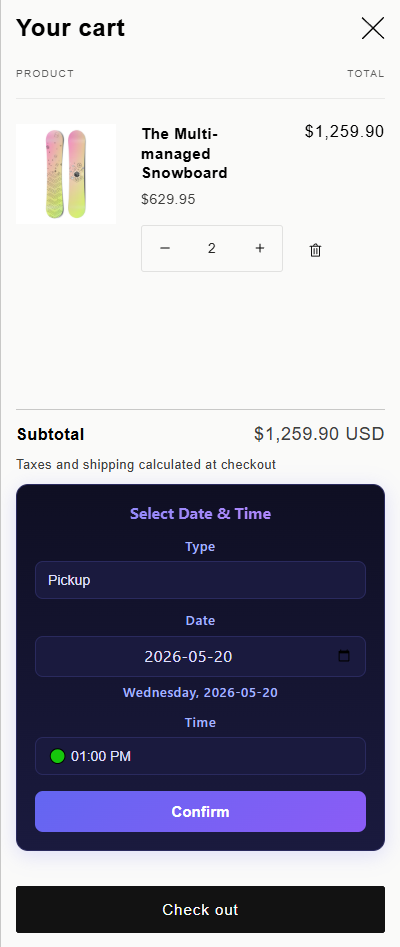
Give customers clear pickup dates and time slots while each location keeps its own hours, preparation time, blackout dates, and order limits.
The operational problem
A merchant with several pickup points may have different opening hours, staffing, and preparation capacity at each one. If customers cannot choose a valid location and time before checkout, staff must clarify the order later and customers may arrive before it is ready.
Larkis Date Time Picker connects the choice of pickup location with an individual schedule. Customers see available options, while the merchant controls lead time and capacity instead of resolving conflicts after purchase.
What changes in practice
Give every pickup point its own available days, hours, and preparation requirements.
Save the confirmed location, date, and time to the cart so the order arrives with structured details.
Use preparation time to hide pickup slots that do not leave the team enough time to make the order.
Automatically support the store locale across more than 30 languages and choose from 21 themes.
How to get started
The exact setup depends on your service model, but the operational sequence stays simple.
Create the locations customers should be able to select during the Shopify order flow.
Set opening hours, unavailable dates, preparation time, and slot limits independently.
Show the picker inline or through a popup or floating button on the page that best fits the store.
Test an order for every location and make sure the confirmed pickup details reach the operational dashboard.
Common questions
Need to validate a specific workflow? Contact support@larkis.app.
Yes. Larkis Date Time Picker supports multiple pickup locations with individual schedules and preparation times.
Yes. Order limits help prevent more customers from selecting a window than the location can support.
It can appear inline, as a floating button, or in a popup on cart and product pages.
The Standard plan includes unlimited usage for $7 USD per month after the 14-day free trial.
Built for Shopify